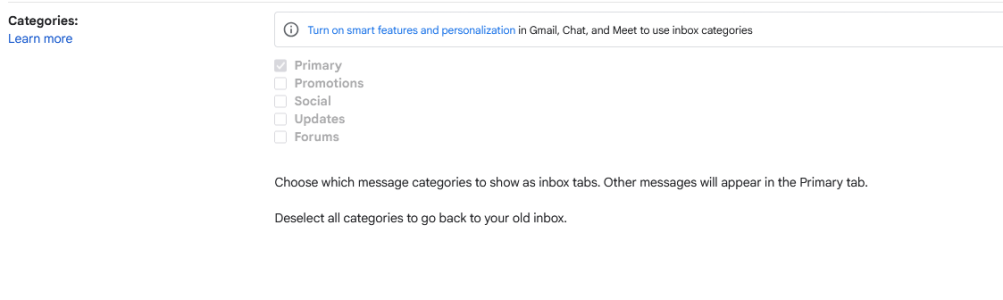
I think we are talking about two different things. Primary inbox is a Smart Features thing that automatically reads your emails and automatically labels them based on the categories listed in your screenshot.
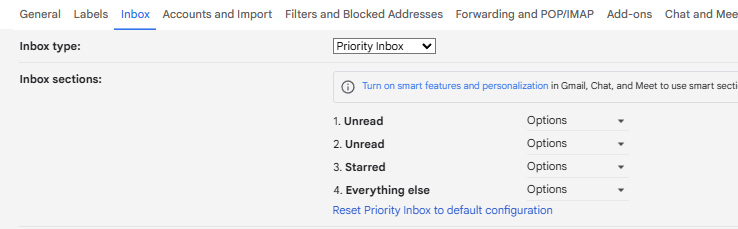
What I'm referring to is Priority Inbox, which is one of the inbox layout options. It is located under the INBOX tab under the settings.
View attachment 14357
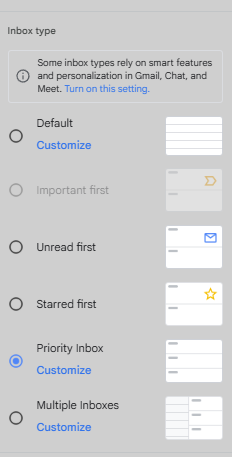
It also pops up under the quick settings under INBOX TYPE:
View attachment 14358
As you can see in my first screenshot, priority inbox is activated and I have my sections selected. It has the little tooltip that says Smart Features is required for sections like "Important and Unread" however, this is for automated categorizing. Even without Smart Features turned on, you can manually designate what emails are important by activating the importance flag, which looks like this:
View attachment 14361
It will turn yellow when activated. Emails with this flag will go to the "priority inbox" which are unread emails that are also important. They show up at the top of the gmail browser interface. You can set phone notifications to only alert you when you get emails in the "priority inbox" Other, non-important emails that come in, will appear as unread but show up in the "everything else" section and will not trigger a phone alert.
Other than that, you can create labels to automatically label your emails with traditional email filters and it behaves like the gemini feature. Maybe not as smart at times, but for repetitive type emails like order confirmations, it is fine. I think you m ay have more options to mess with the labels using the Multiple Inboxes layout option, but I have not used or tried that, so I'm not sure how it works. I've used priority inbox since it was first introduced back in 2010. Hopefully, google doesn't decide to remove it and force gemini usage.
Sorry if all of this was useless info. I may have misunderstood the issue.